Introductory Tutorial
SqlSynthGen, or SSG for short, is a software package that we have written for synthetic data generation, focussed on relational data. When pointed to an existing relational database, SSG creates another database with the same database schema, and populates it with synthetic data. By default the synthetic data is crudely low fidelity, but the user is given various ways to configure the behavior of SSG to increase fidelity, while maintaining transparency and control over how the original data is used to inform the synthetic data, to control privacy risks.
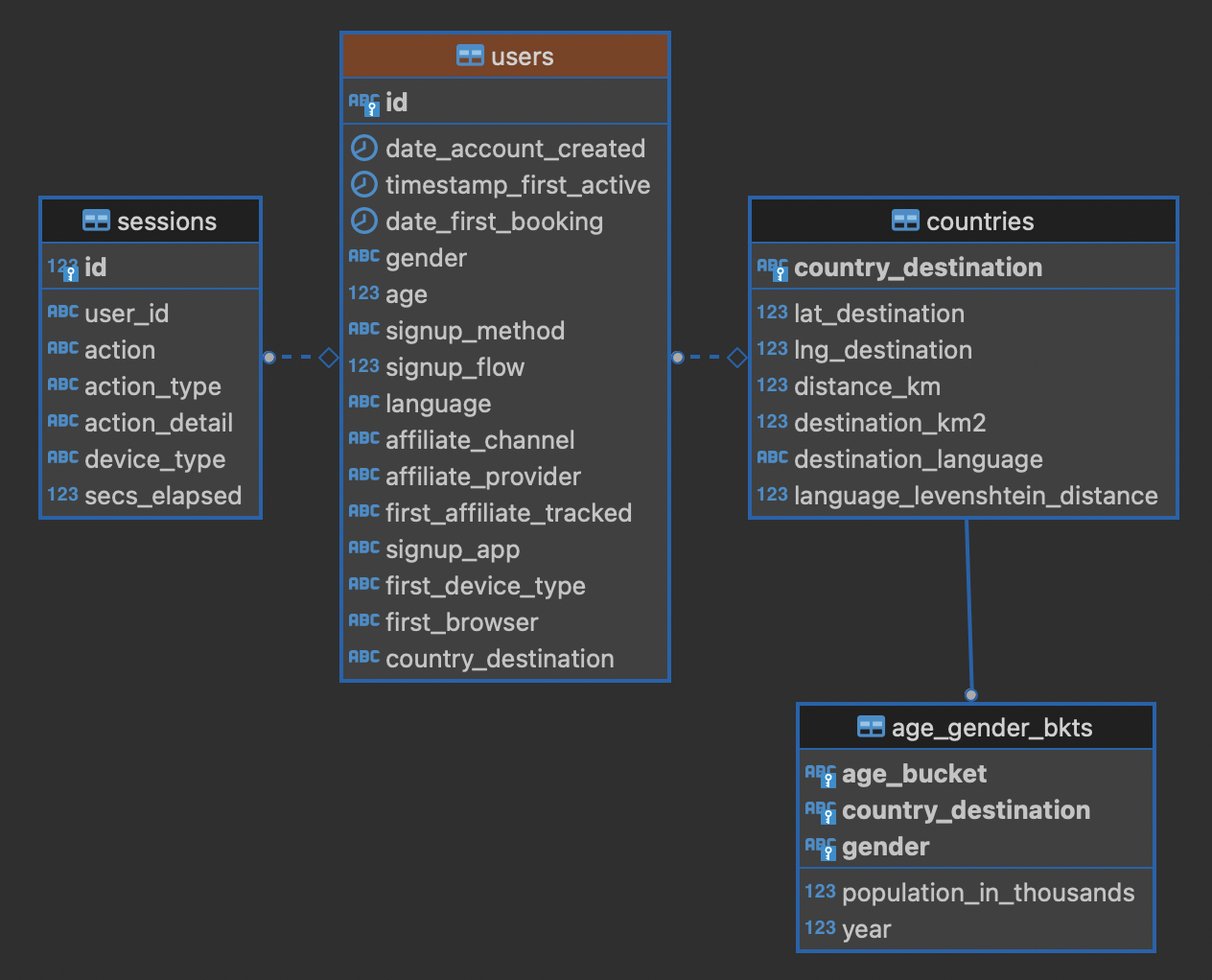
In this tutorial, we go through the different mechanisms SSG has for configuring the data generation, and the different levels of fidelity they can provide and different kinds of utility they can have. To showcase SSG, we will use the AirBnb User Bookings dataset, available at Kaggle. The original dataset is a collections CSV files, that can be ported to a relational database using this Python script (it requires having SSG previously installed). After migration, the database has the following structure:
Default Behavior
SSG contains tools for replicating the schema of a source database.
Let us consider that the AirBnb data is contained in the airbnb database in our local PostgreSQL instance.
We would like to replicate its schema to the dst database, and generate synthetic data mimicking the records present on airbnb.
First, we need to provide SSG with the connection parameters, using a .env file like the following:
.env:
SRC_DSN='postgresql://postgres:password@localhost/airbnb'
DST_DSN='postgresql://postgres:password@localhost/dst'
We can start the schema migration process by running the following command:
$ sqlsynthgen make-tables
When executed successfully, this command makes an orm.py file, containing the schema of the airbnb database.
To use this file to replicate the schema in dst, we run the following command:
$ sqlsynthgen create-tables
Furthermore, we can use the orm.py file to make a Python module that generates synthetic data:
$ sqlsynthgen make-generators
This file will contain one generator class (not to be confused with Python generator functions) per source database table. By default, without any user configuration, the data produced by this generator fulfills the schema of the original data.
SSG presumes that any primary keys it encounters will be auto-populated when a row is inserted into the table.
This is often true, for example, when a column is declared as the SERIAL pseudo-type.
However, this is not the case for the AirBnB dataset.
For example, the USERS table’s primary key ID column is of type VARCHAR.
Running the next command, create-data, will produce an error:
$ sqlsynthgen create-data
...
psycopg2.errors.NotNullViolation:
To work around this, we will manually specify how the primary keys should be generated for the COUNTRIES, USERS and AGE_GENDER_BKTS tables by editing the ssg.py file.
For example, in line 6 we specify that the id column value should be created using a password Mimesis provider, which will give us a random string of characters.
The generic object in line 6 corresponds to a generic provider instance , that SSG makes available within every ssg.py module.
ssg.py:
1class usersGenerator:
2    num_rows_per_pass = 1
3
4    def __init__(self, src_db_conn, dst_db_conn):
5        pass
6        self.id = generic.person.password()
7        self.date_account_created = generic.datetime.date()
8        ...
Mimesis has a wide array of provider for different scenarios.
See this Python file for the full changes.
Now when we run create-data, we get valid, if not very sensible, values in each of our tables. For example:
age_bucket |
country_destination |
gender |
population_in_thousands |
year |
|---|---|---|---|---|
8k$X-en |
vQjTJ=p* |
1m>?l]”} |
485 |
534 |
SSG’s default generators have minimal fidelity: All data is generated based purely on the datatype of the its column, e.g. random strings in string columns. Foreign key relations are respected by picking random rows from the table referenced. Even this synthetic data, nearly the crudest imaginable, can be useful for instance for testing software pipelines. Note that this data has no privacy implications, since it is only based on the schema.
Vocabulary Tables
The simplest configuration option available to increase fidelity is to mark some of the tables in the schema to be “vocabulary” tables. This means that they will be copied verbatim from the original source data into the synthetic data database. This should of course only be done for tables that hold no privacy-sensitive data, but rather hold fixed non-sensitive lists of concepts or facts that the rest of the schema references.
For instance, in the AirBnB dataset, our relational database has a table for users that has a foreign key reference to a table of world countries. users.country_destination references the countries.country_destination column.
Since the countries table doesn’t contain personal data, we can make it a vocabulary table.
Besides manual edition, on SSG we can also customise the generation of ssg.py via a YAML file,
typically named config.yaml.
We identify countries as a vocabulary table in our config.yaml file:
config.yaml:
1tables:
2  countries:
3    vocabulary_table: true
The vocabulary tables are exported from the source database when the generator module is made, so we overwrite ssg.py with one that includes the vocabulary import classes, using the --force option:
$ sqlsynthgen make-generators --config-file config.yaml --force
This will export the countries table rows to a file called countries.yaml in your current working directory:
 1- country_destination: AU
 2  destination_km2: 7741220
 3  destination_language: eng
 4  distance_km: 15297.744
 5  language_levenshtein_distance: 0.0
 6  lat_destination: -26.853388
 7  lng_destination: 133.27516
 8- country_destination: CA
 9  destination_km2: 9984670
10  destination_language: eng
11  distance_km: 2828.1333
12  language_levenshtein_distance: 0.0
13  lat_destination: 62.393303
14  lng_destination: -96.818146
15  ...
We need to truncate any tables in our destination database before importing the countries data with:
$ sqlsynthgen create-vocab
We must now re-edit ssg.py to add the primary key VARCHAR workarounds, as we did in section above.
Once this is done, we can generate random data for the other three tables with:
$ sqlsynthgen create-data
From now on, whenever we make a change to config.yaml, we should re-run these steps:
Run
sqlsynthgen make-generators --config-file config.yaml --force.If necessary, perform any manual edits to
ssg.py.Truncate the non-vocabulary database tables.
Run
create-data.
To recap, “vocabularies” are tables that don’t need synthesising. By itself this adds only limited utility, since the interesting parts of the data are typically in the non-vocabulary tables, but it saves great amounts of work by fixing some tables with no privacy concerns to have perfect fidelity from the get-go. Note that one has to be careful in making sure that the tables marked as vocabulary tables truly do not hold privacy sensitive data, otherwise catastrophic privacy leaks are possible, where the original data is exposed raw and in full.
Specifying Row-based Custom Generators
As we’ve seen above, ssg.py is overwritten whenever you re-run make-generators.
To avoid having to manually edit ssg.py after each overwrite, we can map columns to “row generators” in the config file:
config.yaml:
 1tables:
 2  age_gender_bkts:
 3    num_rows_per_pass: 1
 4    row_generators:
 5      - name: generic.person.password
 6        columns_assigned: gender
 7      - name: generic.person.password
 8        columns_assigned: age_bucket
 9      - name: generic.column_value_provider.column_value
10        args: [dst_db_conn, orm.Countries, '"country_destination"']
11        columns_assigned: country_destination
12
13  users:
14    num_rows_per_pass: 0
15    row_generators:
16      - name: generic.person.password
17        kwargs: null
18        columns_assigned: id
The next time we run make-generators, the config-specified row generator will override the default one and we will not need to edit the ssg.py directly any more.
You may notice in the above code block a few magical-seeming keywords, namely generic, dst_db_conn, and orm, that deserve an explanation.
genericis the object that is used to reference Mimesis providers, which you already met earlier.dst_db_connis a SQLAlchemy database connection object for the destination database. Generator functions can use it to for example fetch a random ID for a row in a different table, which is what thegeneric.column_value_provide.column_valuegenerator above does.ormis the module of theorm.pyfile.
As you write a configuration for row generators to use, the names of the generator functions and the arguments passed to these generator functions should consist of these three objects and their fields, constants, and one additional special case called SRC_STATS that we will introduce in the next section.
We can also use the custom row generators to add more fidelity to the data.
Examples include specifying that a column’s value should be an integer in a given range or should be chosen at random from a list of acceptable values.
We see below that we have used these techniques to populate the sessions.secs_elapsed column with random integers in the range 0-3,600 and sessions.action with any one of the three most common action types from the source dataset:
config.yaml:
 1tables:
 2  sessions:
 3    row_generators:
 4      - name: generic.numeric.integer_number
 5        kwargs:
 6          start: 0
 7          end: 3600
 8        columns_assigned: secs_elapsed
 9      - name: generic.choice
10        kwargs:
11          items: ["show", "index", "personalize"]
12        columns_assigned: action
We can also define our own custom generators in a separate module and then use them to generate values for one or more columns.
For example, in the users table, we may want to ensure that the date_first_booking is optional and never comes before the date_account_created.
To accomplish this, we define a custom generator, which is a function that returns a tuple with two dates.
In this tuple, the second item may be None and always comes at least a calendar year after the first item:
airbnb_generators.py:
 1def user_dates_provider(generic):
 2    date_account_created: datetime.date = generic.datetime.date(start=2010, end=2015)
 3
 4    booking_date: Optional[datetime.date] = None
 5    if generic.choice([True, False]):
 6        booking_date = generic.datetime.date(
 7            start=date_account_created.year + 1, end=2016
 8        )
 9
10    return date_account_created, booking_date
Then, we tell SSG to import our custom airbnb_generators.py and assign the return values of our generator function to the two columns in our users table:
config.yaml:
 1row_generators_module: airbnb_generators
 2
 3tables:
 4 users:
 5     row_generators:
 6        - name: generic.person.identifier
 7          kwargs:
 8             mask: '"@@##@@@@"' # Using this provider, we generate alpha-numeric IDs.
 9          columns_assigned: id
10        - name: airbnb_generators.user_dates_provider
11          kwargs:
12             generic: generic
13          columns_assigned: ["date_account_created", "date_first_booking"]
Note how we pass the generic object as an argument to user_dates_provider.
Limitations to this approach are that rows can not be correlated with other rows in the same table, nor with any rows in other tables, except for trivially fulfilling foreign key constraints as in the default configuration.
This level of configuration allows us to make the data look much more plausible, especially when looked at locally on the level of individual rows.
The sessions.action column can have plausible actions rather than random strings, a session’s duration can be in a plausible range of numbers and users don’t make bookings before creating an account:
id |
date_account_created |
date_first_booking |
|---|---|---|
TK53EDBJ |
2011-10-21 |
|
BY13UILQ |
2015-04-12 |
2016-12-29 |
WA25VOAU |
2011-02-08 |
2013-07-03 |
YT49ANJT |
2015-11-16 |
Still there are no privacy implications, but data can be generated that e.g. passes various filters and WHERE clauses that one might realistically run on the data, opening new utility, especially in testing.
Using Aggregate Statistics from the Source Data
Beyond copying vocabulary tables, SSG allows for the original data to affect the synthetic data generation process only through a particular mechanism we call source statistics.
To use it, the user writes in the configuration file SQL queries that are executed on the source data, and their output is written into a file, typically called src-stats.yaml.
The file is both machine and human-readable, and its contents are available to be used as inputs into the custom generators we discussed above.
In principle this allows moving over arbitrary information about the source data, but using the source statistics feature with row-by-row queries is considered an anti-pattern. Rather, the queries should compute some aggregate properties of the source data: the mean and standard deviation of the values in some column, the average age of a person, a histogram of relative frequencies of pairs of values in two different columns, etc. By using the outputs of these queries as arguments in the custom generators one can, for instance, match uni- or multi-variate distributions between the source data and the synthetic data, such as setting the average age of the synthetic people to be the same as that in the real data.
In the AirBnb dataset, if we want to generate normally-distributed values with the right mean and standard deviation for the users.age column, we would define a config.yaml with the following content:
config.yaml:
 1src-stats:
 2  - name: age_stats
 3    query: >
 4      SELECT AVG(age), STDDEV(age)
 5      FROM users
 6      WHERE age <= 100
 7
 8tables:
 9  users:
10    row_generators:
11      - name: airbnb_generators.user_age_provider
12        kwargs:
13          query_results: SRC_STATS["age_stats"]
14        columns_assigned: age
Note that the src-stats.name property of age_stats (line 22) matches the SRC_STATS dictionary key age_stats.
On line 13 we pass the query results (defined on lines 4 - 6) to a custom generator via the SRC_STATS variable and assign the return value to the age column in line 14.
The custom generator is the function airbnb_generators.user_age_provider (line 4), whose content is the following:
airbnb_generators.py:
1def user_age_provider(query_results):
2    mu: float = query_results[0][0]
3    sigma: float = query_results[0][1]
4    return random.gauss(mu, sigma)
After airbnb_generators.py has been edited, you need to generate an src-stats.yaml file by running:
$ sqlsynthgen make-stats --config-file config.yaml --force
With this command, the results of the query defined in config.yaml will be stored in the src-stats.yaml file. If you recreate the generators stored in ssg.py, you can verify that the query results are exposed via the SRC_STATS variable.
From there they can be passed to your generators as arguments.
Within the function user_age_provider, defined in airbnb_generators.py, the query_results argument represents the results of the age_stats query.
Using config.yaml over the AirBnb dataset, src-stats.yaml contains the following:
src-stats.yaml:
1age_stats:
2  - - 36.55849236836584
3    - 11.727350098614563
Note the difference between this approach and some other approaches to synthetic data, such as those that use neural networks trained on the original data.
Here, the user has to manually specify exactly which statistical properties of the original data are extracted, and exactly how they are used to inform the synthetic data.
This means more manual work for the user, especially if many aspects of the synthetic data want to be matched with the original.
However, it provides complete transparency and control over how the original data is used, and thus over possible privacy implications.
One can look at the queries run to produce source statistics, and their outputs in the src-stats.yaml file, and if one is satisfied that publishing these results poses an acceptable privacy risk, then publishing any amount of synthetic data generated based on them can only pose less of a risk.
Even if only aggregate statistics about the source data are used, they can still leak private information.
If for instance we would do a SELECT COUNT(*), gender FROM people GROUP BY gender query to find out the gender distribution of the people in our data, and there were only a few people with “other” as their gender, their presence or absense in the dataset could be leaked by the aggregate query.
To protect against such privacy leaks, we can add differential privacy to our source statistics queries, which adds noise to the results to hide the effects of individuals.
For differential privacy, SSG uses a package called SmartNoiseSQL, that runs SQL queries and adds appropriate amounts of noise to the results to make them differentially private.
Here’s how you could add differential privacy to the above age-stats query:
config.yaml:
 1src-stats:
 2  - name: age_stats
 3    query: >
 4      SELECT age, id
 5      FROM users
 6      WHERE age <= 100
 7    dp-query: >
 8      SELECT AVG(age), STDDEV(age)
 9      FROM query_result
10    epsilon: 0.1
11    delta: 0.000001
12    snsql-metadata:
13      max_ids: 1
14      id:
15        type: string
16        private_id: true
17      age:
18        type: float
19        lower: 0
20        upper: 100
The query is now done in two stages.
First, a regular SQL query, the one called query, is executed on the database, and the results are fetched to the memory of the machine that SSG is being run on, in a table called query_result.
Then a second query called dp-query is run on the table query_result, using SmartNoiseSQL (snsql), to compute aggregates in a differentially private way.
To be able to do this, we need to provide SmartNoiseSQL some extra information:
epsilonanddeltaare the parameters that control the strength of the differential privacy guaranteeThe snsql-metadata block holds information about the columns in
query_result. There must always be one column marked withprivate_id: trueto be the one that identifies the “unit of privacy”, e.g. individual people. Data types must also be provided for all columns, and for numerical columns a minimum and maximum values that they can take are needed. Please refer to the SmartNoiseSQL documentation for a detailed explanation of all the parameters available and their meaning.
Through the robustness to post-processing property of differential privacy, if the values in src-stats.yaml are generated in a differentially private way, the synthetic data generated based on those values can not break that guarantee.
To learn more about differential privacy and the meaning of its parameters, please read this white paper from Microsoft.
At the time of writing, SmartNoiseSQL is somewhat limited in the kinds of queries it can run.
For instance, joins and subqueries are not possible.
This is why it is typically necessary to do some preprocessing of the data in the query before the differentially private aggregation, usually an AVG, a SUM or a COUNT, is done in dp-query.
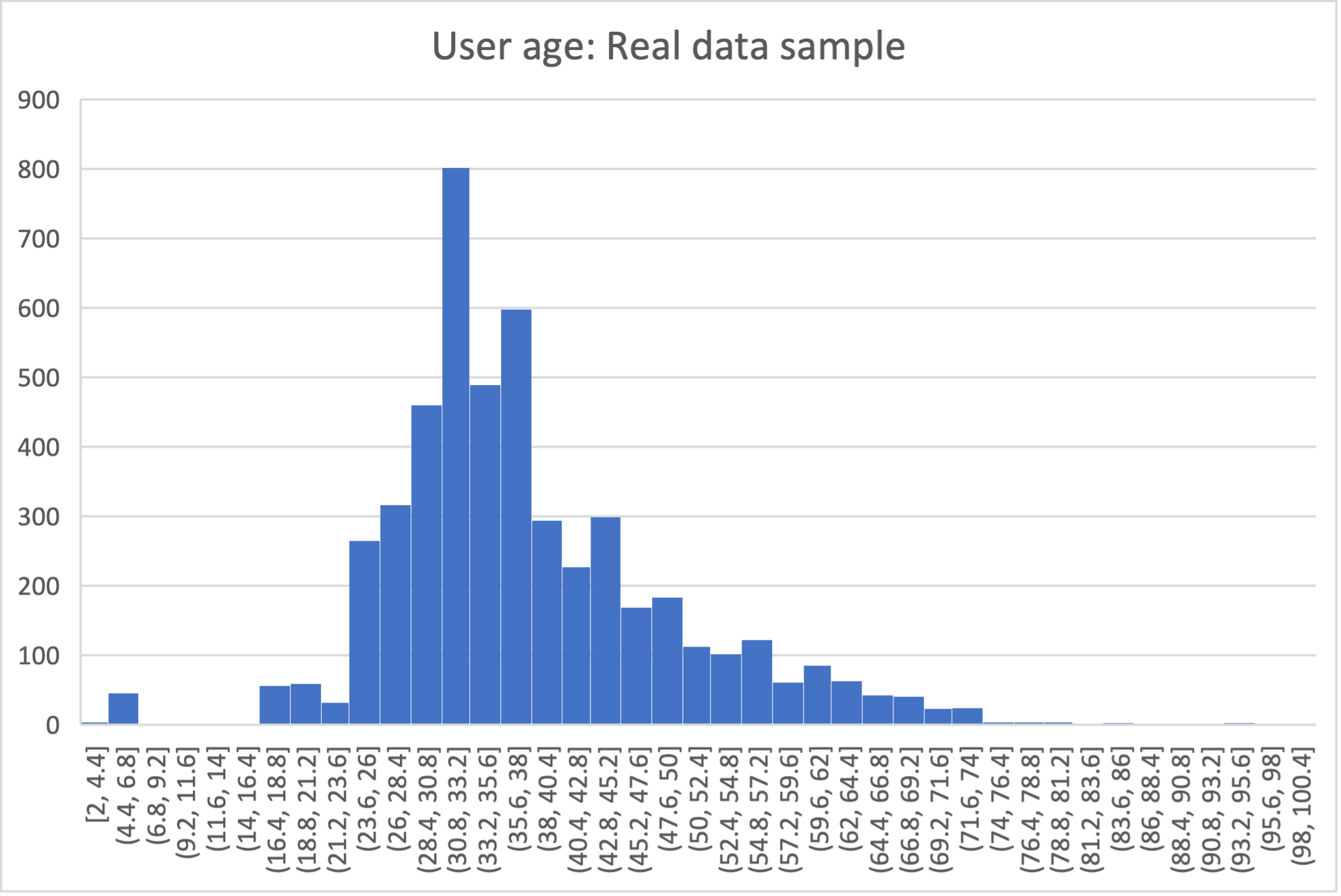
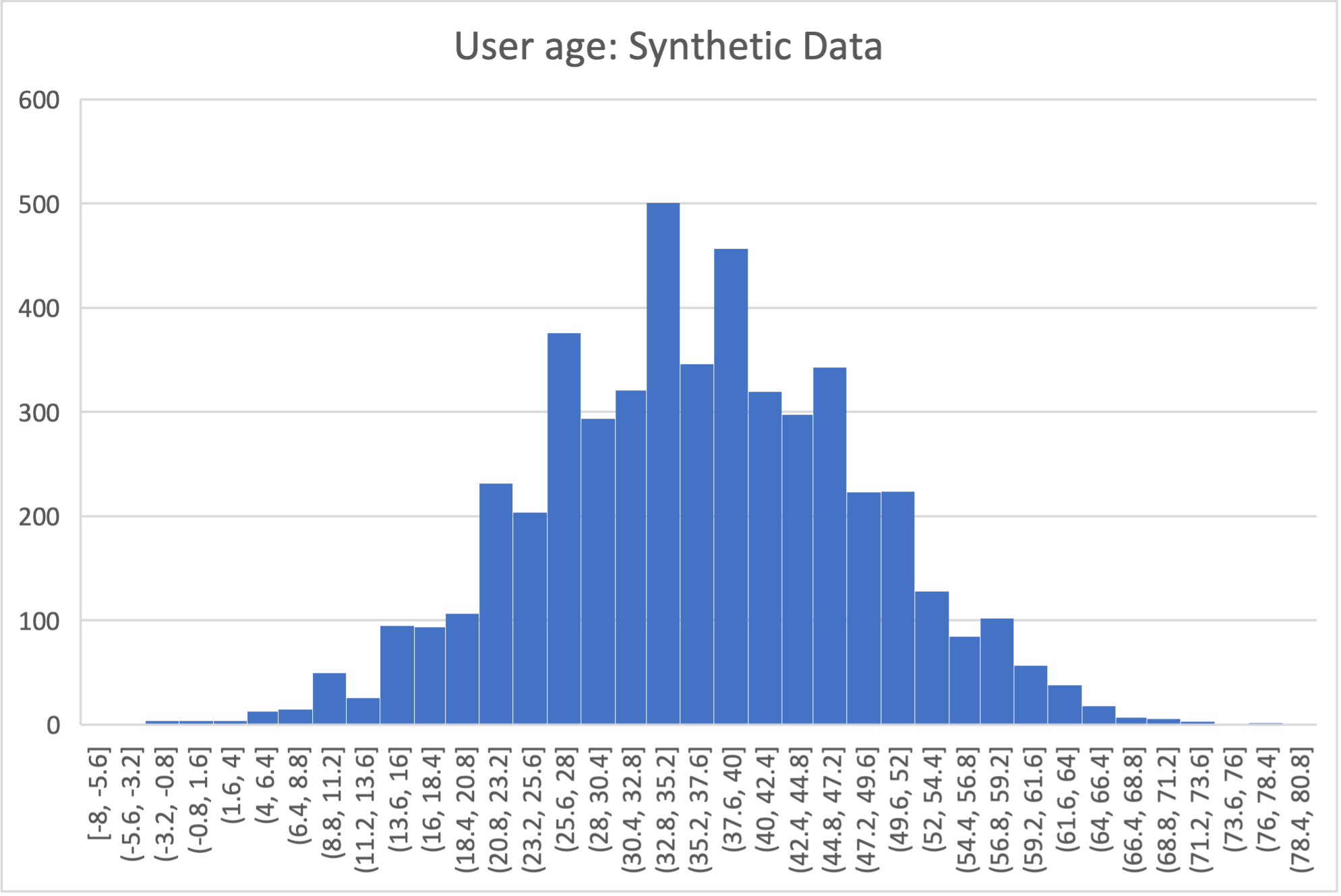
Below is an example of the kind of fidelity one can obtain by combining custom row generators with source statistics queries.
raw vs synthetic ages histogram:
One final aspect of source statistics bears mentioning:
At the top level of config.yaml one can also set use-asyncio: true.
With this, if there are multiple source stats queries to be run, they will be run in parallel, which may speed up make-stats significantly if some of the queries are slow.
“Stories” Within the Data
The final configuration option available to users of SSG is what we call “story generators”. These address generating synthetic data with correlations that bridge different tables and multiple rows.
A story generator is a Python generator (an unfortunate clash of terminology: Python uses the term “generator” to refer to objects that yield multiple values in a sequence), written by the user, that yields rows to be written into the synthetic database.
For instance, it may first yield a row specifying a person in the users table, and then multiple rows for the sessions table that specify various browsing sessions this user has had:
airbnb_generators.py:
 1import random
 2
 3def sessions_story():
 4    """Generate users and their sessions."""
 5    device_types = ["Mac Desktop", "Windows Desktop", "iPhone"]
 6
 7    # a new user will be sent back to us with our randomly chosen device type
 8    user: dict = yield (
 9        "users",  # table name
10        {
11            "first_device_type": random.choice(device_types)
12        }  # see 1. below
13    )
14
15    # create between 10 and 19 sessions per user
16    sessions_per_user: int = random.randint(10, 20)
17
18    for _ in range(sessions_per_user):
19        if random.random() < 0.8:
20            # most often, the session is from the user's sign-up device...
21            yield (
22                "sessions",
23                {
24                    "user_id": user["id"],  # see 2. below
25                    "device_type": user["first_device_type"],
26                }
27            )
28        else:
29            # ...but sometimes it is from any device type
30            yield (
31                "sessions",
32                {
33                    "user_id": user["id"],
34                    "device_type": random.choice(device_types)},
35            )
Three features make story generators more practical than simply manually writing code that creates the synthetic data bit-by-bit:
When a story generator yields a row, it can choose to only specify values for some of the columns. The values for the other columns will be filled by custom row generators (as explained in a previous section) or, if none are specified, by SSG’s default generators. Above, we have chosen to specify the value for
first_device_typebut the date columns will still be handled by ouruser_dates_providerand the age column will still be populated by theuser_age_provider.Any default values that are set when the rows yielded by the story generator are written into the database are available to the story generator when it resumes. In our example, the user’s
idis available so that we can respect the foreign key relationship betweenusersandsessions, even though we did not explicitly set the user’sidwhen creating the user.
To use and get the most from story generators, we will need to make some changes to our configuration:
config.yaml:
 1tables:
 2  ...
 3  users:
 4     num_rows_per_pass: 0  # see 1 below
 5     ...
 6
 7  sessions:
 8     num_rows_per_pass: 0  # see 1 below
 9     ...
10
11story_generators_module: airbnb_generators  # see 2 below
12
13story_generators:
14  - name: airbnb_generators.sessions_story
15    num_stories_per_pass: 30  # see 3 below
After editing the config.yaml file, you can run:
$ sqlsynthgen make-generators --config-file=config.yaml --stats-file=src-stats.yaml --force
This will regenerate the ssg.py file to incorporate your story generator.
By default, story generators will run in addition to custom row generators so we will set the number of row-generated users and sessions to 0. We could keep these >0 for a mix of row- and story-generated users and sessions.
We specify the module that contains our story generators. In this case, it is the same Python file as the row generators.
We specify that we have one story generator and that it will be called 30 times. Note that, unlike row generators, the story generator is not linked to any particular table as it specifies the table name whenever it
yields.
Story generators allow for nearly unlimited fidelity if enough work is put in to write them.
Above, we have created a correlation between only two tables but one can create arbitrary correlations between many tables and variables, including complex time series such as a patient’s test results or a customer’s orders.
This opens utility far beyond simple pipeline testing or showcasing, including fitting statistical models to the synthetic data that could perform non-trivially well on the real data.
The output of the source statistics queries are available as arguments for the story generators, just like they are for the custom row generators.
Thus the synthetic data generated can be made to match the original data in whatever ways are desired.
The only significant limitation is that referencing or updating rows created before the current story was run is not easy (although not entirely impossible either, by using the dst_db_conn object).
Note that we make here the same trade off as we did before: generating very high fidelity data requires significant effort on the user’s part, in writing the Python code for any story generators that are needed, and any source statistics SQL queries needed to inform those generators of properties of the original data. This is in contrast with other more automated synthetic data generators, such as GANs, which automatically learn various features of the source data and try to replicate them. However, what we gain are:
Full transparency and control over the ways in which the source data is utilised, and thus the ways in which privacy could in principle be at risk, including easy implementation of differential privacy guarantees.
The possibility of starting from very low fidelity data, and incrementally adding fidelity to particular aspects of the data, as is needed to serve the utility of whatever use case the synthetic data is created for.
Examples of the complete files generated by the tutorial can be found at: /sqlsynthgen/tests/examples/airbnb.